
This is a list for adults who have already tried the apps. You have a graveyard of them on your phone, each one abandoned at a slightly different stage, and you are not looking for another feature tour. You want to know which ones survive a bad week.
ADHD apps for adults is a category covering four quite different jobs: getting things out of your head, deciding what to do next, seeing your day, and remembering any of it tomorrow. Most apps do one of those well and quietly assume you will handle the rest. That assumption is where they fall apart, because the rest is the part your brain finds hardest.
So this page is organised around which job each app actually does, what it costs, and where it stops helping.
The criteria came from watching where apps get abandoned rather than from a feature list. Every app here is judged on four things.
Does it survive a bad week? This is the only criterion that really matters. An app that works when you are rested and organised is not solving your problem. The test is what happens after four days of not opening it: does it welcome you back, or does it present you with a wall of overdue red and a broken streak? Apps that punish absence get abandoned, because opening them feels worse than not opening them.
How much upkeep does it demand? Every field you have to fill in, every tag you have to choose, every project you have to file something under is a small tax. Individually they are trivial. Together they are the reason your last system died. An app that needs maintenance to stay useful will lose to one that stays useful while neglected.
Does it make a decision, or hand you a list? A list of forty things is not a plan. It is the same overwhelm you started with, now sorted alphabetically. The apps worth using narrow the field for you, whether that is by surfacing one task, laying out a timed day, or asking you the same three questions every morning.
Is it honest about what it does not do?No app here is good at everything, and the ones that claim to be are the ones you abandon fastest. Where a tool on this list beats doot, that is stated plainly. A list where the author wins every category is an advert wearing a list's clothes.
What did not make the cut: apps that are a to-do list with a different colour scheme, anything that requires you to learn a methodology before your first task, and anything whose main pitch is that it is free. Free matters, but a free app you stop opening costs you more than a paid one you keep.
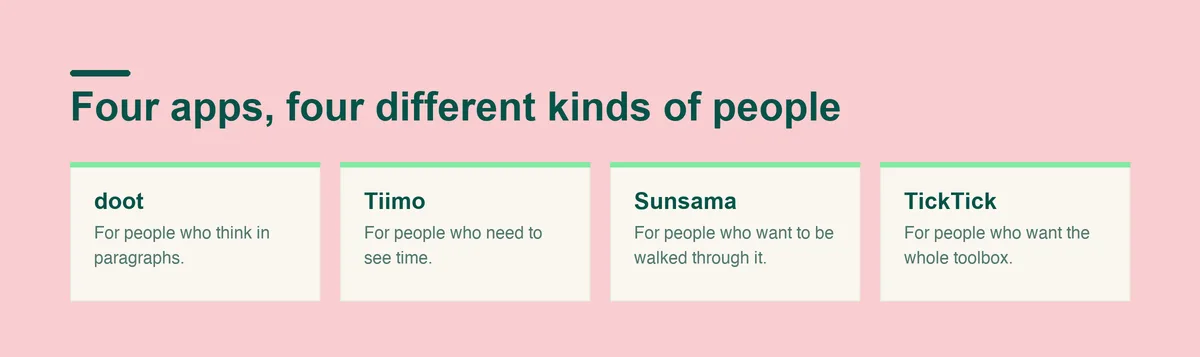
Four tools, each genuinely better than the others at one specific thing. Read the "where it falls short" line before the rest, because that is the line that tells you whether the app fits the way your week actually goes.
Most capture tools want structure from you at the exact moment you have none. You are walking to the kitchen with six things in your head, and the app asks you to pick a project, set a date, and choose a priority for each one. So you type one of them, lose the other five, and close the app.
Type or say everything at once, in one tangled paragraph, and doot splits it into separate tasks. You write the way you think, which is usually a run-on sentence containing your mother, a deadline, and the fact that you are out of milk, and it comes back as distinct items rather than one long note you will have to unpick later.
The second thing it does is show the day as one view you can take in quickly, instead of rows you have to work down. This sounds cosmetic until you have stared at forty rows of text and felt your attention slide off them. And when a whole day is still too much, doot can hide everything except the one thing to do next, which is the difference between starting and reorganising.
doot proposes and you decide: no task moves unless you move it. Trust in a planner dies the moment you open it and find that something moved while you were not looking, so doot does not move anything on its own.
There is a second thing worth naming, which is what doot does not ask of you. You do not have to choose a project before you can write something down, pick a tag, or decide which list a thought belongs in. Those choices feel small when you read them in a feature list. They are the whole problem when you are trying to offload six things in the ninety seconds before you forget them, because each one is a tiny fork in the road and forks are where attention leaks out.
The trade you are making is control at capture time for review time afterwards. You dump first and correct after, rather than filing correctly as you go. If you are someone who finds a slightly wrong draft unbearable, that trade will annoy you. If you are someone whose tasks currently live in your head and nowhere else, it is the trade that gets them out.
Who it suits: you think and talk faster than you can file, and your notes app is already full of paragraphs you have never turned into anything.
What it costs: doot is USD 8.99 a month, or USD 24.99 once for lifetime access. The web app has a free plan.
Where it falls short: if what you actually need is a visual timeline of your day, Tiimo is better at visual daily schedules and better at routines. If you want to be walked through planning every morning, Sunsama is better at that guided daily ritual. And if you want deep features and mature apps on every platform you own, TickTick is better on both counts. doot is built narrow on purpose, and narrow is the wrong shape for some people.
Some people do not have a task problem, they have a time problem. You know what you have to do. You cannot feel how long it will take, or how much of the afternoon is left, and so you arrive at 6pm having done two of the six things and no idea where the day went.
Tiimo is better at visual daily schedules than doot is, and better at routines. If your day works best as a visual strip of blocks you can look at rather than a list you have to decode, that is what it is built for. It is also better at mobile polish, which matters if your phone is where your planning actually happens.
The reason a visual day works when a list does not is that a list hides duration. Six items look like six items whether they take ten minutes or four hours each, so you agree to all of them and then discover at four in the afternoon that item two was the whole day. Laid out as blocks, the same six items are visibly impossible before you start, and you get to have that argument with yourself in the morning rather than at midnight.
Who it suits: you lose time rather than lose tasks, and a timeline tells you more than a list does.
Where it falls short: a visual schedule still has to be built, and building it is upkeep. If your problem is the pile in your head rather than the shape of your day, you will be doing data entry before you get any benefit.
Sunsama is better at guided daily ritual than doot, and better at calendar integration depth. It asks you, every day, to plan that day, and the structure of being asked is the product. For a lot of people that ritual is exactly the external scaffolding that makes planning happen at all, because the app initiates and you respond, rather than you having to initiate from a standing start.
The calendar depth matters if your work is genuinely calendar-shaped, with meetings that move and a real need for your tasks and your appointments to agree with each other.
What makes this work is not the planning itself, which you could do on paper. It is that the app starts the conversation. Initiation is the expensive step for a lot of adults with ADHD, and a tool that reliably goes first removes exactly that cost. The ritual also creates a natural moment to be honest about yesterday, which is the part most systems skip and the part that stops a list quietly filling up with things you are never going to do.
Who it suits: you will do the thing if something asks you to, and your day is built around a calendar.
Where it falls short: a daily ritual is a daily commitment. The apps in this category work beautifully for the weeks you do them and leave a conspicuous gap in the weeks you do not, and ADHD supplies plenty of the second kind.
TickTick is better at feature depth than doot, and better at cross-platform maturity. If you want filters, recurring rules, a built in timer, and the same app working properly on a phone, a laptop, a tablet and a watch, this is the one on the list built that way.
The depth is real, and it is genuinely useful once your system is settled. Some people do not want an opinionated tool that decides things for them, they want a good general purpose one they can bend into their own shape.
Cross-platform maturity is underrated until you have lost something to it. If capture only works properly on one device, then whatever occurs to you while you are away from that device either gets remembered or gets lost, and remembering is the thing that does not work. A tool that is genuinely good everywhere means the capture habit can be the same everywhere.
Who it suits: you like configuring things, and configuring it is not going to be the reason you stop.
Where it falls short: everything TickTick can do is something you have to decide about. For people whose executive function is the bottleneck, a big configurable toolbox becomes another project, and the project quietly replaces the work.
Two weeks is the useful test, and the two weeks have to include a bad one. An app judged across a good fortnight tells you nothing, because almost anything works when you are rested. Install it, and then deliberately do not tidy it for four days somewhere in the middle. What you are measuring is what the app looks like when you come back to it.
Three questions at the end of the fortnight. Did you open it on the days you least felt like it? Did it ever tell you what to do next without you having to read the whole list? And when you neglected it, did coming back feel neutral or did it feel like being told off? An app that fails the third question will be deleted eventually no matter how good the first fortnight was.
Do not migrate everything to run this test. Run it on one live area of your life, with real tasks that have real consequences, and leave the rest where it is. Migrating first is how people spend a weekend building a system they then abandon, which feels like failure and is really just a badly designed trial.
Some of the best ADHD tools are not ADHD apps at all. A recurring alarm labelled with the actual next action beats a beautifully tagged task nobody reads. A shared note with a partner beats a private system nobody sees. If you are already using Todoist and it mostly works, changing tools is a way to feel productive without being productive, and doot has a full write up on making Todoist work with ADHD rather than replacing it.
Specific jobs work the same way. If the thing defeating you is the flat, there is a separate piece on building an ADHD cleaning schedule that does not depend on a new app at all, and if you want a starting structure rather than a blank screen, the ADHD to do list template is free to copy.
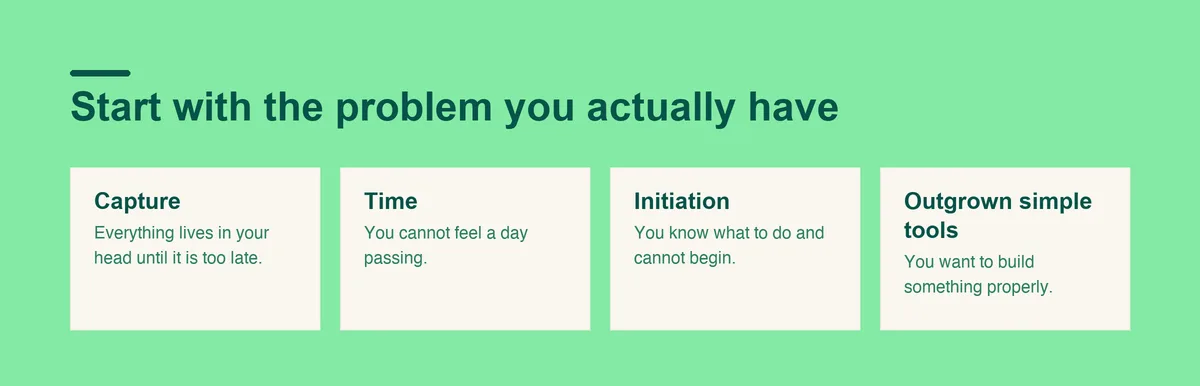
The honest summary is that these four apps are not really competing, because they solve different bottlenecks. Work out which sentence below describes your week, and the choice mostly makes itself.
Prices as of September 2026.
If your problem is capture, that everything lives in your head until it is too late, start with doot, because turning a paragraph into tasks is the specific job it does.
If your problem is time, that you cannot feel a day passing, start with Tiimo. If your problem is initiation, that you know what to do and cannot begin, Sunsama's morning ritual is the mechanism that helps most. And if your problem is that you have outgrown simple tools and want to build something properly, TickTick will not run out of room.
There is a fifth option worth stating, which is none of them. If your week is currently held together by alarms and a shared note with someone who lives with you, and it is working, the correct number of new apps is zero. The best ADHD tools are frequently not apps, and adding one to a system that already functions usually adds a place for things to hide rather than a place for them to be found.
One caution about switching. The best apps for ADHD are the ones you are still opening in March, and every migration resets that clock. If a tool you already have is at seventy percent, seventy percent that you keep using beats a perfect system you abandon in three weeks. Change tools when the tool is the problem, not when the week has been hard.
Open Doot, put the whole mess in at once, and see whether the list that comes back is one you can act on.
Try it free on the webarrow_forward