
AI planners, and which one fits how you work

An AI planner is any tool that takes what you have to do and decides where it goes, instead of leaving you to place every item yourself. They split into three groups that solve genuinely different problems, and picking the wrong group is why people try three of these and conclude none of them work.

AI planner

How we picked these

Six tools, each judged on what it does with your input rather than on how much AI is in the marketing.

  • What it actually automates. Some of these schedule your calendar for you, some help you plan a day by hand, and some turn unstructured text into tasks. Those are three different jobs.
  • What it needs from you first. A tool that auto-schedules needs a well-formed task list before it can do anything, and building that list is the part many people cannot do.
  • What it costs, from the vendor's own page. Every price below is quoted from the company's pricing page, checked in September 2026.
  • Whether it survives a bad week. Anything needing a daily planning ritual works until the first week you skip it, and the recovery cost is what decides whether you come back.
  • Whether you can leave. Tools that hold your tasks in a proprietary structure are harder to exit than ones that sit on top of a calendar you already own, which is worth knowing before a year of data goes in.

One more thing worth saying before the list. An AI planner cannot manufacture a decision about what matters. Poor time management, planning and organization are recognised adult ADHD symptoms, and automation helps with the arranging rather than with the deciding underneath it.
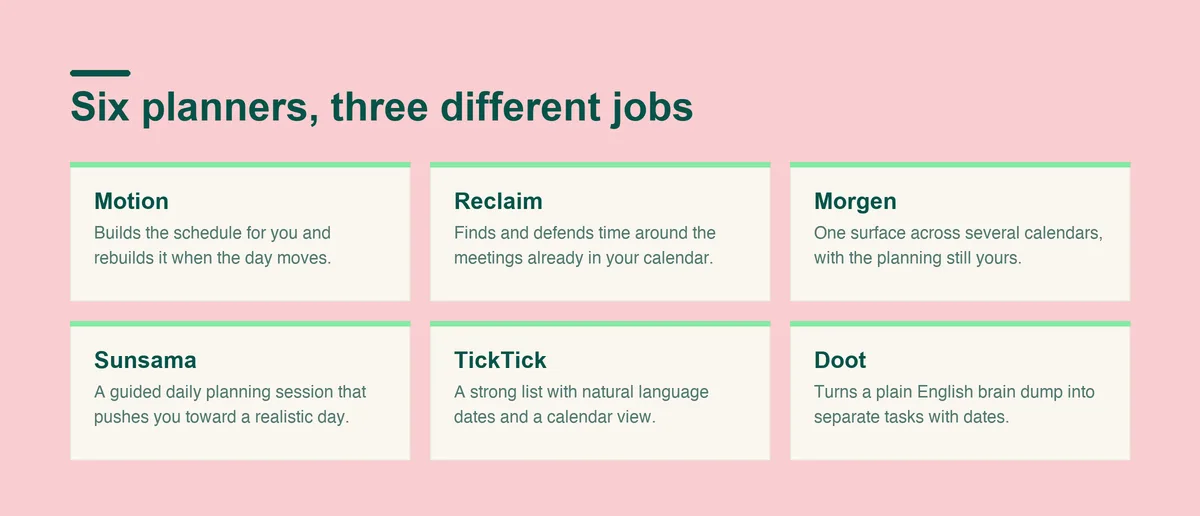
Six AI planners, and what each one actually does

Six AI planners and what each does: Motion and Reclaim schedule for you, Morgen and Sunsama help you plan, TickTick holds the list, and Doot turns a brain dump into tasks

Grouped by the job each one does, because that is the only distinction that matters when choosing.

The three groups are worth naming plainly. Auto-schedulers take a task list and place it in time for you. Calendar-led planners give you one surface and better tools for placing things yourself. Capture-led tools work on the step before either of those, turning unstructured input into tasks that something else can then schedule.

Most disappointment with this category comes from buying across groups: someone whose head is full buys an auto-scheduler, feeds it a vague list, and gets a confident schedule built on guesses.

Motion, for automatic rescheduling of a full workload

  • What it does. Takes your tasks, deadlines and meetings and builds the schedule for you, then rebuilds it when something moves.
  • Who it suits. People with many deadline-bound tasks and meetings, who want the ordering handled.
  • What it costs. Motion lists Pro AI at $19 /seat /mo and Business AI at $29 /seat /mo.
  • Where it falls short. It needs a complete, well-estimated task list to work from, and the automatic rescheduling can feel like an argument on a day that went sideways.

Motion is the most automated option here, and automation cuts both ways. When the task list is accurate it removes the entire question of what to do next. When it is not, the schedule it produces is confidently wrong, and correcting it costs more than planning by hand would have.

Reclaim, for defending time inside a busy calendar

  • What it does. Finds and protects time for habits, tasks and breaks around the meetings already in your calendar.
  • Who it suits. Anyone whose problem is meetings eating the day rather than an unsorted task list.
  • What it costs. Reclaim has a free plan called Lite, with Starter listed at $10 per seat/month and Business at $15 per seat/month.
  • Where it falls short. It is a calendar tool first, so it assumes your calendar is already the source of truth about your work.

Reclaim is the right answer to a specific complaint: the day is full of other people's meetings and nothing else fits. It is the wrong answer if your calendar is mostly empty and the work still is not happening, because there is nothing there for it to defend against.

Morgen, for planning a day across several calendars

  • What it does. Pulls calendars and task apps into one place and helps you time block the day deliberately.
  • Who it suits. People running work and personal calendars in different accounts who want one view.
  • What it costs. Morgen lists Pro at $30 per month, billed monthly, and $15 per month, billed yearly.
  • Where it falls short. The planning is led by you rather than done for you, which is an advantage or a dealbreaker depending on why you came.

Morgen sits between the automated tools and the manual ones. You keep the decisions and it removes the friction of holding four calendars in your head, which suits people who found auto-scheduling too opinionated.

Sunsama, for a deliberate daily planning ritual

  • What it does. Walks you through planning each day, pulling tasks in from other tools and asking you to commit to a realistic amount.
  • Who it suits. People who will genuinely sit down each morning and plan, and who want that habit supported.
  • What it costs. Sunsama is listed at $22 per month, billed monthly.
  • Where it falls short. The ritual is the product, and the ritual is the first thing that goes in a bad week.

Sunsama is the most demanding tool on this list and the most rewarding for the right person. The daily planning session is roughly ten minutes, and everything good about the product depends on you doing it, which is worth being honest with yourself about before paying for a year.

TickTick, for a solid list with light scheduling

  • What it does. A capable task manager with natural language dates, recurring tasks and a calendar view.
  • Who it suits. People whose problem is capture and reminders rather than scheduling.
  • What it costs. TickTick lists a free plan at US$0 and Premium at US$49.99 /Year.
  • Where it falls short. It organises what you give it and leaves the planning to you, so it is a list rather than an ai daily planner.

TickTick is the cheapest way to find out whether your problem is really scheduling. If a plain list with good reminders fixes most of it, the automated tools were never going to earn their price.

Doot, for turning an unsorted pile into a day

  • What it does. Takes a plain English brain dump, typed or spoken, and returns separate tasks with dates, then shows one next action at a time.
  • Who it suits. People whose bottleneck is the mess in their head rather than the arrangement of their calendar.
  • What it costs. Doot costs USD 8.99 a month, or USD 49.99 once for lifetime access, and the web app has a free plan.
  • Where it falls short. It is not a calendar replacement, and it does not auto-schedule a workload of meetings.

Doot is deliberately narrow. It does one part of the chain, the part between a head full of half-formed obligations and a list you could actually act on, and it leaves scheduling to whatever calendar you already use.

The pattern across all six: the first three assume you already know what your tasks are, and the last one is aimed at the step before that. If you have tried an ai planner app and felt it was asking you questions you could not answer, that mismatch is usually why.

How they compare

ToolBest forWhat it costs
MotionAutomatic scheduling of a deadline-heavy workloadPro AI $19 /seat /mo, Business AI $29 /seat /mo
ReclaimProtecting time around meetingsFree Lite plan, Starter $10 per seat/month
MorgenOne deliberate plan across several calendars$30 monthly, or $15 a month billed yearly
SunsamaA supported daily planning ritual$22 per month, billed monthly
TickTickCapture, reminders and recurring tasksFree, or Premium US$49.99 /Year
DootTurning an unsorted brain dump into a day$8.99 a month, or $49.99 once, free web plan

Prices as of September 2026, quoted from each vendor's own pricing page. Vendors change pricing often, so check the current figure before paying for a year.

Prices here also compare different units. Motion, Reclaim and Morgen price per seat, which matters if you are buying for a team, while Doot and TickTick price per person outright.

Motion's page states its per seat monthly figure without naming the billing basis, so it is reproduced exactly as printed.

Worth noting before the table is read as a ranking: these are not six versions of the same product, and the cheapest one is not the best value if it solves a problem you do not have.

Two things stand out in that table. The automation-heavy tools cost roughly twice what the list-first tools do, because they are priced for people whose time is billed by the hour. And the free tiers differ in kind: Reclaim's free plan limits automation, TickTick's is a genuinely usable list, and Doot's free web plan covers the capture and sorting.

If you are choosing between them and unsure, the cheapest useful experiment is to work out which sentence describes your week. I know what to do and cannot fit it in points at Motion or Reclaim. I know what to do and keep planning badly points at Morgen or Sunsama. I do not know what I am carrying points at a capture tool, and no amount of scheduling will substitute for that.

AI planners, and which one fits how questions, answered

What is an AI planner? add
An AI planner is a tool that decides where your work goes rather than only storing it: scheduling tasks into your calendar, protecting time around meetings, or turning unstructured notes into dated tasks. The category covers all three, which is why two AI planners can feel nothing alike.
What is the best AI daily planner? add
The best ai daily planner depends on which job you need done. Choose Motion or Reclaim if the scheduling is the problem, Morgen or Sunsama if you want to plan deliberately, and Doot if the real bottleneck is turning a messy head into a list you can act on.
Do AI planners work if you have ADHD? add
AI planners help with arranging rather than with deciding, which matters because poor time management, planning and organization are recognised adult ADHD symptoms. A tool that assumes a complete task list will stall exactly where many people stall, so the capture step is worth solving first.
Is there a free AI planner app? add
Reclaim has a free Lite plan, TickTick has a free tier, and Doot has a free plan on the web. The free tiers generally limit automation rather than storage, so they are best used to test whether the tool's approach suits you.
Can an AI planner replace a to-do list? add
Not usually. Most of these sit on top of a list rather than replacing it, and the ones that generate the list still need you to tell them what you are carrying. The planning layer and the list layer are separate jobs even when one company sells both.
How much should an AI planner cost? add
The tools here run from free to $29 per seat a month. Anything at the top of that range is priced for people who bill their time, so the question worth asking is whether the hours it saves are hours you can actually sell.

Sources

One last practical note on trials. Every tool here offers a way to test it, and the honest test is not a good week but an ordinary one: run it through a day that goes wrong, with an interruption and something you did not finish, and see whether the tool helps you recover or simply records the damage. That single test separates the planners that survive from the ones that get cancelled in month two.

Pick the group first, then the tool.

If the step that keeps breaking is turning the pile in your head into something schedulable, open Doot and start there rather than with a calendar.

Try it free on the webarrow_forward