This page is for people who have bought a planner before. Possibly several. There is one in a drawer with eleven days filled in beautifully and then nothing, and you have been carrying a low-level suspicion ever since that the problem was you.
A planner for ADHD is any system, paper or software, that holds your intentions outside your head and gives them back to you at the moment they matter. The second half of that sentence is where most planners fail. Holding is easy. Giving it back at the right moment, without you having to remember to look, is the hard part, and it is the part worth judging them on.
So this is organised by what actually breaks. Paper first, since that is what most people mean by the word, then the software, then an honest table of which suits whom.
The criteria come from where planners get abandoned, not from what they contain.
What happens after you skip four days? This is the whole game. Every planner works in week one. The question is whether returning to it after a gap feels neutral or feels like being handed a report card. Paper is brutal here, because the empty pages are physically there and you have to turn past them. Apps can be worse, because they can add red numbers and broken streaks on top.
How much does it cost you to use, in effort rather than money? Every planner charges a maintenance fee. Ruling columns, migrating undone tasks, picking a project, choosing a priority. The fee feels affordable on a good week and impossible on a bad one, and the bad weeks are exactly when you need the planner most. A planner with a high fee is a planner that works when you least need it.
Does it narrow, or does it display? Thirty items on a page or a screen do not amount to a plan, they amount to your overwhelm rendered legibly. The planners that hold up either force a short list or surface one thing at a time.
Is capture separate from planning? Most abandonment happens at capture. If you have to open the planner, find the right page or list, and decide where something belongs before you can write it down, then in practice you do not write it down. You tell yourself you will remember. You do not.
Does it forgive you? A good planner for ADHD assumes you will disappear for a stretch, because you will, and it makes coming back cheap.
Anything judged only on how nice it looks when filled in correctly did not make the list. Photographs of completed planners are a genre of aspiration, not evidence.
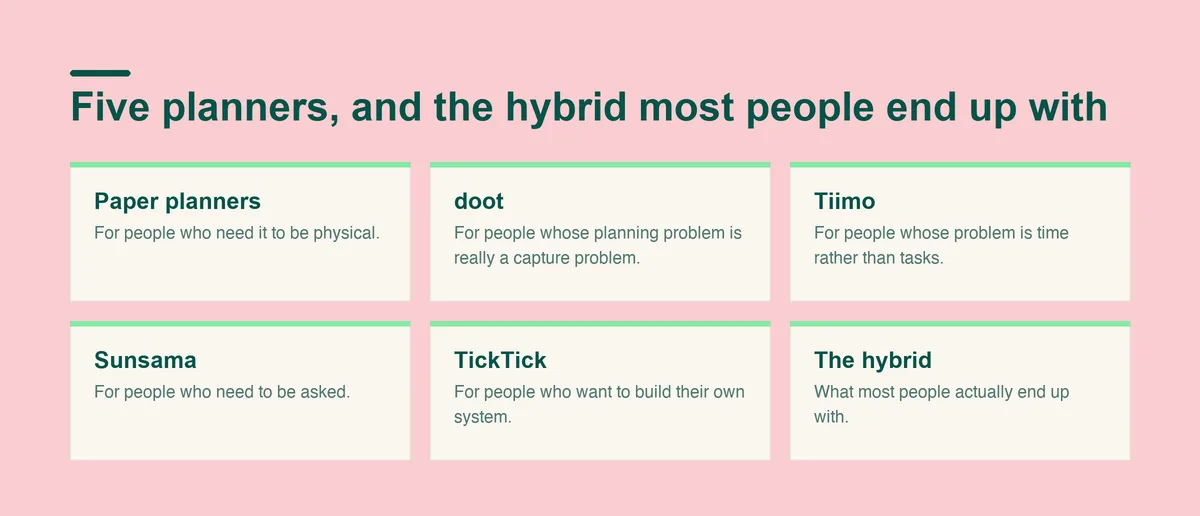
Five approaches, and the honest case for and against each. Read the shortfall line first.
Paper has genuine advantages that no app has matched. Writing by hand is slower, and the slowness makes you commit rather than collect. A paper page cannot notify you, which means it cannot interrupt you, and it never presents you with a settings screen. It is always in the same state you left it. For a lot of people the physical act of turning to today's page is the ritual that makes planning happen at all.
The best planners for ADHD in paper form tend to share three traits: a small fixed number of slots per day so the page cannot become a list of forty, an undated format so a missed fortnight does not leave printed evidence of failure, and a layout that puts today's priorities somewhere your eye lands first.
Undated matters more than the other two, and it is worth saying why. A dated planner prints your absence. Open one in March and you are looking at nine weeks of empty boxes with dates on them, which is a record of failure you did not ask for and have to page through to reach today. An undated book skips straight from the last day you used it to the day you came back, and that single design choice is the difference between a planner you return to and one you quietly put in a drawer.
The fixed slot count matters for the opposite reason. A blank page invites a brain dump, and a brain dump on a day page produces a list of twenty things which is a plan for nobody. Three or five ruled slots force the choice that a long list lets you avoid.
Who it suits: you already reach for a notebook, you like the friction of writing, and you are usually in one place where the book can live.
What it costs: varies widely by brand and format, and it is worth checking current prices directly since the paper planner market changes seasonally.
Where it falls short: paper cannot remind you. Everything a paper planner holds is invisible until you choose to open it, which means it works exactly as well as your habit of opening it, and habits are the thing ADHD is least reliable at. Paper also cannot capture what occurs to you in a supermarket queue unless you are carrying it. Most ADHD planners for adults that fail in the drawer failed on those two points and nothing else.
The reason planners fail for a lot of adults is not the plan. It is that thoughts never survive the trip from your head to the page. You are mid-conversation, six things land at once, and putting them somewhere means opening an app, choosing a list, setting a date and picking a priority, four times over. So you keep them in your head, and by evening you have lost four of the six and the anxiety of knowing you lost something.
You type or say it all in one go, and doot breaks that tangle into separate tasks. You write it the way it arrived in your head, usually a run-on about your mother, a deadline and the milk, and what you get back is a set of distinct items instead of a paragraph waiting to be unpicked.
doot then shows the day as a single view you can take in at once, not a column to read down, which sounds cosmetic until you have felt your attention slide off thirty rows of text without one of them registering. On the days when a whole day is still too much, doot shows you only the one thing to do next and keeps the rest out of the way.
doot proposes and you decide: no task moves unless you move it. Trust in a planner dies the moment you open it and find something moved while you were not looking.
The trade being made is control at capture time for a short review afterwards. You dump first and correct second, instead of filing correctly as you go. If a slightly wrong draft bothers you, that trade will irritate you every time. If your tasks currently live in your head and nowhere else, it is the trade that gets them out, and a draft you correct in twenty seconds beats a perfect entry you never made.
Who it suits: your ideas arrive faster than you can file them, and your notes app is already a graveyard of paragraphs.
What it costs: doot is USD 8.99 a month, or USD 24.99 as a single payment, and the web app has a free plan.
Where it falls short: doot is deliberately narrow. On visual daily schedules and on routines, Tiimo is better than doot, so a timeline of your day is its job rather than this one. If you want to be walked through planning each morning, Sunsama is better at guided daily ritual. If you want depth and configurability across every device, TickTick is better at feature depth and better at cross-platform maturity. Narrow is the point, and for some people it is the wrong shape.
Some people do not lose tasks. They lose hours. You know exactly what needs doing, you cannot feel the afternoon draining, and you arrive at six having done two things.
Tiimo is better at visual daily schedules than doot, and better at routines. A list hides duration: six items look like six items whether each takes ten minutes or four hours, so you agree to all of them and discover too late that item two was the whole day. Blocks laid out visually make the same six items obviously impossible in the morning, when you can still do something about it. Tiimo is also better at mobile polish, which matters when your phone is where planning actually happens.
Who it suits: time blindness is your bottleneck, and seeing the shape of a day helps more than reading it.
Where it falls short: a visual day has to be built before it helps, and building it is maintenance. If your problem is the pile in your head, you will be doing data entry before you get any benefit.
Sunsama is better at guided daily ritual than doot, and better at calendar integration depth. It asks you to plan the day, every day, and being asked is the product. Initiation is the expensive step for many adults with ADHD, and a tool that reliably goes first removes exactly that cost. The ritual also builds in a moment to be honest about yesterday, which stops a planner silently filling with things you will never do.
Who it suits: you will do it if something prompts you, and your work is genuinely calendar-shaped.
Where it falls short: a daily ritual is a daily commitment, and it leaves a conspicuous hole in the weeks you cannot manage it.
TickTick is better at feature depth than doot, and better at cross-platform maturity. Filters, recurring rules, a timer, and the same app working properly on a phone, a laptop and a tablet. Capture that works identically everywhere matters more than it sounds, because whatever occurs to you away from your main device either gets caught or gets lost, and getting lost is the default.
Who it suits: you enjoy configuring things, and configuring is not going to be the reason you quit.
Where it falls short: every capability is a decision you now have to make. When executive function is the bottleneck, a large configurable toolbox becomes a project, and the project quietly replaces the work.
The setup that survives longest, for a lot of people, is not one planner. Capture happens on the phone because the phone is always there, and the day gets looked at somewhere calmer, whether that is a paper page or a single screen. The rule that makes a hybrid work rather than double the work is that only one of them is allowed to be the truth. The phone catches things. The day view decides things. Nothing has to be copied both ways.
Hybrids fail when both halves try to hold everything, because then you are running two systems plus a reconciliation habit, and reconciliation is the first thing to go. If you cannot say in one sentence which half is authoritative, you have two planners rather than one system.
Two weeks, and the two weeks must include a bad one. Anything works when you are rested, so a fortnight of good days tells you nothing. Install it or open it, and then deliberately neglect it for four days somewhere in the middle. What you are measuring is what it looks like when you come back.
Three questions at the end. Did you reach for it on the days you least felt like it? Did it ever tell you what to do next without you reading everything? And did returning after the gap feel neutral, or did it feel like a telling off? Failing the third question predicts abandonment better than any feature comparison.
Run the test on one live area of your life with real consequences. Do not migrate everything first, because rebuilding a whole system over a weekend and then dropping it in March feels like personal failure when it was really just a badly designed trial.
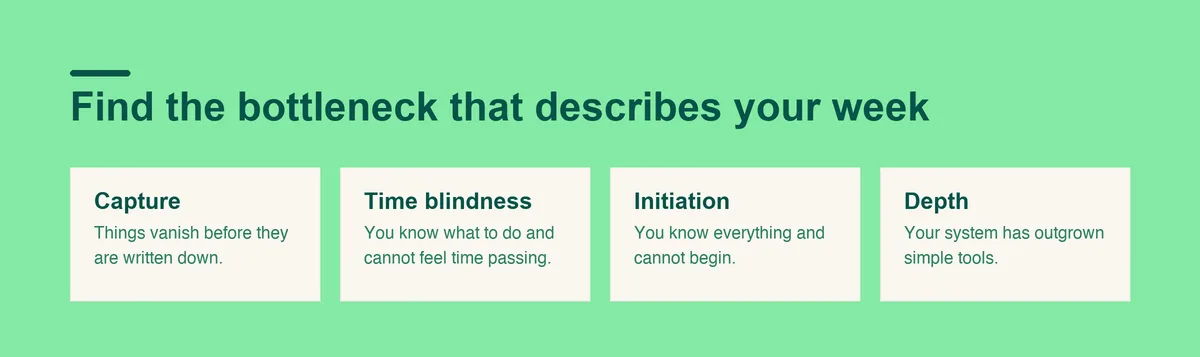
The five options are not really competing, because they fix different bottlenecks. Find the sentence below that describes your week.
Prices as of September 2026.
If things vanish before they are written down, your bottleneck is capture, and doot exists for that specific job. If you know what to do and cannot feel time passing, it is time blindness, and a visual day helps most. If you know everything and cannot begin, it is initiation, and a morning ritual is the mechanism. If your system has outgrown simple tools, depth is what you are missing. And if you want something physical that never pings you, paper is a legitimate answer rather than a nostalgic one.
Two cautions. The first is switching cost. The best ADHD planners for adults are the ones still being opened in March, and every migration resets that clock, so a tool at seventy percent that you keep using beats a perfect system you abandon. Change when the tool is the problem, not when the week was hard.
The second is stacking. Running a paper planner and two apps means three places a task can hide, and a task you cannot find is a task you did not write down. One place to capture and one place to see your day is enough. Those can be the same place.
If your difficulty is less about the planner and more about starting at all, the piece onexecutive dysfunction covers that directly. If the calendar side is where things break, there is a separate write up on building anADHD calendar that works, and if you already use Todoist and want to keep it, the guide to Todoist for ADHD is about making it fit rather than replacing it.
Open Doot and find out whether getting things out of your head is the piece that has been missing.
Try it free on the webarrow_forward